<?xml version="1.0" encoding="utf-8"?><feed xmlns="http://www.w3.org/2005/Atom" ><generator uri="https://jekyllrb.com/" version="3.10.0">Jekyll</generator><link href="https://snellejustin.github.io/feed.xml" rel="self" type="application/atom+xml" /><link href="https://snellejustin.github.io/" rel="alternate" type="text/html" /><updated>2026-02-02T19:24:30+00:00</updated><id>https://snellejustin.github.io/feed.xml</id><title type="html">Passion Project Blog</title><subtitle>Research, notes &amp; experiments</subtitle><author><name>Justin Van Dijck</name></author><entry><title type="html">Day 27 — Tweaking the icy visor</title><link href="https://snellejustin.github.io/2026/02/02/Day-27-Tweaking-the-icy-visor.html" rel="alternate" type="text/html" title="Day 27 — Tweaking the icy visor" /><published>2026-02-02T00:00:00+00:00</published><updated>2026-02-02T00:00:00+00:00</updated><id>https://snellejustin.github.io/2026/02/02/Day-27-Tweaking-the-icy-visor</id><content type="html" xml:base="https://snellejustin.github.io/2026/02/02/Day-27-Tweaking-the-icy-visor.html"><![CDATA[<p><strong>Platform:</strong> Meta Quest 3 (Unity)<br />
<strong>Genre:</strong> Mixed Reality Survival Shooter<br />
<strong>Theme:</strong> North Pole Containment / Thermal Defense</p>

<hr />

<h2 id="overview">Overview</h2>
<p>Sunday was a “polish” day. I spent time actually playing the game and realized the Frost Effect didn’t feel quite right. It was either too subtle or kicked in too early. I refactored the entire intensity logic to make it feel more natural and responsive to the player’s performance.</p>

<hr />

<h2 id="1-refactoring-intensity">1. Refactoring Intensity</h2>
<p>The original code had a “Minimum Intensity” logic, meaning there was always a little bit of frost on the screen. The Problem: It degraded the visual clarity of the Mixed Reality pass-through. If you’re doing well (0 enemies), your vision should be crystal clear.</p>

<p><strong>The Fix:</strong></p>

<p><strong>Removed Minimum Intensity:</strong> If the enemy count is 0, the frost is 0.
<strong>Adjusted Max Values:</strong> I tuned the upper limit so that at “Critical Mass” (15 enemies), the frost is overwhelming but doesn’t completely blind you (capped at 1.7 scale).
<strong>Simplified Math:</strong> I cleaned up the calculation logic. Instead of complex curves, it’s now a cleaner linear mapping that feels more predictable.</p>

<hr />

<h2 id="3-unity">3. Unity</h2>
<p>screenshot of frost tuning</p>]]></content><author><name>Justin Van Dijck</name></author><summary type="html"><![CDATA[Platform: Meta Quest 3 (Unity) Genre: Mixed Reality Survival Shooter Theme: North Pole Containment / Thermal Defense]]></summary></entry><entry><title type="html">Day 26 — Art Style Changes</title><link href="https://snellejustin.github.io/2026/01/31/Day-26-Art-style-changes.html" rel="alternate" type="text/html" title="Day 26 — Art Style Changes" /><published>2026-01-31T00:00:00+00:00</published><updated>2026-01-31T00:00:00+00:00</updated><id>https://snellejustin.github.io/2026/01/31/Day-26-Art-style-changes</id><content type="html" xml:base="https://snellejustin.github.io/2026/01/31/Day-26-Art-style-changes.html"><![CDATA[<p><strong>Platform:</strong> Meta Quest 3 (Unity)<br />
<strong>Genre:</strong> Mixed Reality Survival Shooter<br />
<strong>Theme:</strong> North Pole Containment / Thermal Defense</p>

<hr />

<h2 id="overview">Overview</h2>
<p>Saturday was about defining the look and feel of the game. I decided to steer the art direction towards a “Medium Low Poly” style. It’s not super blocky (like Minecraft), but it keeps things geometric and readable, which is perfect for VR performance and readability.</p>

<hr />

<h2 id="1-the-frost-effect-upgrade">1. The Frost Effect (Upgrade)</h2>
<p>I wasn’t 100% happy with just slapping a texture on a quad. I updated the frost shader to use a different approach with a new Low-Poly Icy Material. It creates a crystallized look that creeps into your vision (animated movements), matching the new sharp, geometric art style of the world.</p>

<hr />

<h2 id="2-the-new-thermal-lance">2. The New Thermal Lance</h2>
<p>The original placeholder weapon had to go. I modeled a proper Thermal Lance (actually more like a welding gun at this point) in Blender, keeping with the medium low-poly aesthetic.
<strong>Custom Materials:</strong> I wathced a tutorial on how to properly import materials from Blender to Unity.
<strong>Integration:</strong> I hooked up all the existing logic (Heat, Shooting, Welding) to this new model.</p>

<hr />

<h2 id="3-result">3. Result</h2>

<p>The game is starting to look cohesive. the wall debris, icy visor and now the weapon all share this “Medium Low Poly” language. The next model that has to be updated is the enemy (for the 4th time by now).</p>

<hr />

<h2 id="4-unity">4. Unity</h2>
<p>screenshot of new lance and frost</p>

<hr />

<h2 id="5-resources">5. Resources</h2>
<p>https://www.youtube.com/watch?v=yloupOUjMOA –&gt; materials from blender to unity
https://www.youtube.com/watch?v=mCpRxFP2J1c –&gt; icy low poly visor</p>

<hr />]]></content><author><name>Justin Van Dijck</name></author><summary type="html"><![CDATA[Platform: Meta Quest 3 (Unity) Genre: Mixed Reality Survival Shooter Theme: North Pole Containment / Thermal Defense]]></summary></entry><entry><title type="html">Day 25 — Atmospheric Feedback</title><link href="https://snellejustin.github.io/2026/01/29/Day-25-Atmospheric-feedback.html" rel="alternate" type="text/html" title="Day 25 — Atmospheric Feedback" /><published>2026-01-29T00:00:00+00:00</published><updated>2026-01-29T00:00:00+00:00</updated><id>https://snellejustin.github.io/2026/01/29/Day-25-Atmospheric-feedback</id><content type="html" xml:base="https://snellejustin.github.io/2026/01/29/Day-25-Atmospheric-feedback.html"><![CDATA[<p><strong>Platform:</strong> Meta Quest 3 (Unity)<br />
<strong>Genre:</strong> Mixed Reality Survival Shooter<br />
<strong>Theme:</strong> North Pole Containment / Thermal Defense</p>

<hr />

<h2 id="overview">Overview</h2>

<p>Thursday was about feedback—telling the player visually when things are going wrong. I added an Alarm System for when enemies breach, and a Frost Effect that freezes your visor as the situation gets worse.</p>

<hr />

<h2 id="1-the-frost-effect-use-the-right-way-no">1. The Frost Effect: Use the “Right” Way? No.</h2>

<p>I wanted a vignette of ice to creep in from the corners of your vision. Naturally, I tried to do this the “official” Unity/Meta way. I spent an entire day wrestling with the URP Post-Processing Stack and Scriptable Renderer Features.</p>

<p><strong>The Challenge:</strong> In Mixed Reality, getting a transparent shader to properly overlay on top of the Passthrough Layer (the real-world video feed) appereantly wasn’t as easy as i thought. I watched tutorials and tried to set up a Full Screen Blit pass. Nothing worked. It was either invisible, or just didnt want to setup properly in Unity.</p>

<p><strong>The “Dumb” Solution:</strong> After wasting hours, I deleted the entire Rendering logic and did something stupidly simple: I created a primitive Quad (a flat 3D plane), put the frost material on it, and parented it directly to the CenterEyeAnchor of the OVRCameraRig.</p>

<p>It literally just floats a few centimeters in front of your face. <strong>Result:</strong> It looks (almost) exactly the same as a fancy Post-Processing effect.</p>

<hr />

<h2 id="2-alarm-system">2. Alarm System</h2>

<p>I also implemented a global visual alarm. When a wall breaks, the whole HUD flashes red and displays “BREACH DETECTED”. This uses a CanvasGroup to pulse the alpha of the warning text, ensuring you don’t miss the fact that a monster is walking into your living room.
I did this kind of the same way, by making the canvas float infront of the player’s eyes.</p>

<hr />

<h2 id="3-unity">3. Unity</h2>

<p>screenshot of frost effect</p>

<hr />

<h2 id="4-resources">4. Resources</h2>

<p>https://www.youtube.com/watch?v=mCpRxFP2J1c
https://www.youtube.com/watch?v=mNpC6nB4uFM</p>

<hr />]]></content><author><name>Justin Van Dijck</name></author><summary type="html"><![CDATA[Platform: Meta Quest 3 (Unity) Genre: Mixed Reality Survival Shooter Theme: North Pole Containment / Thermal Defense]]></summary></entry><entry><title type="html">Day 24 — Trying to optimise spawn, occlusion &amp;amp; lancebeam</title><link href="https://snellejustin.github.io/2026/01/28/Day-24-Trying-to-optimise-spawn,-occlusion-&-lancebeam.html" rel="alternate" type="text/html" title="Day 24 — Trying to optimise spawn, occlusion &amp;amp; lancebeam" /><published>2026-01-28T00:00:00+00:00</published><updated>2026-01-28T00:00:00+00:00</updated><id>https://snellejustin.github.io/2026/01/28/Day-24-Trying-to-optimise-spawn,-occlusion-&amp;-lancebeam</id><content type="html" xml:base="https://snellejustin.github.io/2026/01/28/Day-24-Trying-to-optimise-spawn,-occlusion-&amp;-lancebeam.html"><![CDATA[<p><strong>Platform:</strong> Meta Quest 3 (Unity)<br />
<strong>Genre:</strong> Mixed Reality Survival Shooter<br />
<strong>Theme:</strong> North Pole Containment / Thermal Defense</p>

<hr />

<h2 id="overview">Overview</h2>
<p>Wednesday was a bit of a mixed bag. I tried to improve the occlusion system to make enemies hide better behind real-world objects, i also tried to make the enemies not spawn under objects such as beds and couches, but it didn’t go as planned. However, I did manage to fix a really annoying visual glitch with the thermal lance effects.</p>

<hr />

<h2 id="1-struggles">1. Struggles</h2>
<p>After adding the basic occlusion yesterday, I wanted to make it “smarter.” I tried to tweak the shader to handle edge cases where the enemy would clip through the wall slightly. 
the enemies seemed to be ‘stuck’ in the floor, also the enemy can come through a broken piece of wall underneath an object, this all has to do with the occlusion i added yesterday.
It seems like it changed some things in the logic, but it needs to be there, otherwise you can see enemies through walls and object. I spent about 3 hours tweaking depth tests trying to fix the segmenting of the walls (who are also under objects)</p>

<p><strong>The Result:</strong> Failed. Every change I made either made the wall invisible or made the enemy invisible at the wrong time.</p>

<hr />

<h2 id="2-fixing-z-fighting">2. Fixing Z-Fighting</h2>
<p>The one win of the day was fixing the “Lance Impact” effect. When you shoot the wall, a glowing “heat scorch” decal appears.
Because this decal was spawned exactly ON the wall surface (Distance = 0), the graphics card got confused about which pixels should be on top (The Wall or The Decal). 
This caused a flickering effect known as Z-Fighting.
This issue also has to do with the new occlusion logic, but with this its mostly fixed.</p>

<p><strong>The Fix:</strong> I added a tiny offset to the spawn logic. Now, when the raycast hits the wall, the decal is spawned 2cm (0.02f) away from the surface, along the normal.
Vector3 spawnPos = hit.point + (hit.normal * 0.02f);</p>

<hr />

<h2 id="3-result">3. Result</h2>
<p>Visuals: The flickering is completely gone. The heat marks look solid and stable, even when you move your head around. The occlusion is back to the “Basic but Functional” version from Tuesday.</p>

<hr />

<h2 id="4-unity">4. Unity</h2>

<hr />

<hr />

<h2 id="4-unity-1">4. Unity</h2>
<p>screenshot of lance impact</p>]]></content><author><name>Justin Van Dijck</name></author><summary type="html"><![CDATA[Platform: Meta Quest 3 (Unity) Genre: Mixed Reality Survival Shooter Theme: North Pole Containment / Thermal Defense]]></summary></entry><entry><title type="html">Day 23 — Breaching of enemies &amp;amp; occlusion shader</title><link href="https://snellejustin.github.io/2026/01/27/Day-23-Breaching-of-enemies-&-occlusion-shader.html" rel="alternate" type="text/html" title="Day 23 — Breaching of enemies &amp;amp; occlusion shader" /><published>2026-01-27T00:00:00+00:00</published><updated>2026-01-27T00:00:00+00:00</updated><id>https://snellejustin.github.io/2026/01/27/Day-23-Breaching-of-enemies-&amp;-occlusion-shader</id><content type="html" xml:base="https://snellejustin.github.io/2026/01/27/Day-23-Breaching-of-enemies-&amp;-occlusion-shader.html"><![CDATA[<p><strong>Platform:</strong> Meta Quest 3 (Unity)<br />
<strong>Genre:</strong> Mixed Reality Survival Shooter<br />
<strong>Theme:</strong> North Pole Containment / Thermal Defense</p>

<hr />

<h2 id="overview">Overview</h2>
<p>Tuesday was all about making the “Invasion” feel real. Up until now, enemies just spawned in the room (or in the void). 
I wanted them to actually feel like they were coming from the cold outside into your warm room. This required a complete rewrite of the spawning logic and some shader magic.</p>

<hr />

<h2 id="1-the-breach-mechanic">1. The Breach Mechanic</h2>
<p>I moved the enemy spawning logic into the DestructibleGlobalMeshManager. Now, the destruction of a wall and the spawning of an enemy are linked events.</p>

<p><strong>The Logic:</strong></p>

<p>A wall segment breaks (opening a hole).
The code calculates a vector from the Player to the Wall.
It extends this vector 4 meters outward (behind the real wall).
It spawns the enemy there and tells it to walk through the new hole.
The Result: the wall breaks, and you see an enemy coming at you from the snowy void outside. It’s much simpler but way more immersive than just fading them in.</p>

<hr />

<h2 id="2-refactoring-spawning">2. Refactoring Spawning</h2>
<p>Previously, I had a separate EnemySpawner script that just picked random spots. It was messy and didn’t know about the walls. By moving this into the DestructibleManager, I can control exactly when and where enemies appear. No more enemies spawning inside furniture or floating in the ceiling. They always come from a breach.</p>

<hr />

<h2 id="3-urp-occlusion-shader">3. URP Occlusion Shader</h2>
<p>To make this work visually, I needed a way to hide the enemies while they were still “behind” the unbroken walls. In Mixed Reality, the “real” wall isn’t a digital object, so it doesn’t automatically block virtual objects.</p>

<p><strong>The Solution:</strong> I added created a URP Occlusion Shader. This is a special material that checks the “Depth Buffer” but renders nothing (invisible). I applied this to the invisible room mesh.</p>

<p><strong>Result:</strong> It acts like a “Collision Mask” for light. The real-world wall now correctly “hides” the virtual enemy standing behind it. The enemy only becomes visible when it steps through the hole (where the occlusion mesh is removed). Same with object such as tables, couches and everything else that is scanned before playing.</p>

<hr />

<h2 id="4-unity">4. Unity</h2>
<p>screenshot of enemy breaching</p>]]></content><author><name>Justin Van Dijck</name></author><summary type="html"><![CDATA[Platform: Meta Quest 3 (Unity) Genre: Mixed Reality Survival Shooter Theme: North Pole Containment / Thermal Defense]]></summary></entry><entry><title type="html">Day 21 — Cooldown Mechanics &amp;amp; Polish</title><link href="https://snellejustin.github.io/2026/01/25/day-21-Cooldown-and-repair-wall-objects.html" rel="alternate" type="text/html" title="Day 21 — Cooldown Mechanics &amp;amp; Polish" /><published>2026-01-25T00:00:00+00:00</published><updated>2026-01-25T00:00:00+00:00</updated><id>https://snellejustin.github.io/2026/01/25/day-21-Cooldown-and-repair-wall-objects</id><content type="html" xml:base="https://snellejustin.github.io/2026/01/25/day-21-Cooldown-and-repair-wall-objects.html"><![CDATA[<p><strong>Platform:</strong> Meta Quest 3 (Unity)<br />
<strong>Genre:</strong> Mixed Reality Survival Shooter<br />
<strong>Theme:</strong> North Pole Containment / Thermal Defense</p>

<hr />

<h2 id="overview">Overview</h2>
<p>Sunday was a big day for mechanics. I finally implemented a proper heat/cooldown system for the lance so you can’t just spam it forever. 
I also refactored the entire welding logic because the old one was a mess, and fixed a 4-day long bug where I couldn’t see the UI.</p>

<hr />

<h2 id="1-the-heat-mechanic">1. The Heat Mechanic</h2>
<p>The Thermal Lance is a powerful weapon, but it needed a downside. I added a heat system that builds up as you fire.</p>

<p><strong>Heating Up:</strong> Firing adds heat over time (takes 5 seconds to max out). 
<strong>Overheat:</strong> If you hit 100% heat, the weapon jams. You have to wait for it to fully cool down (0%) before you can shoot again. 
<strong>Visuals:</strong> I added a new Cooldown UI on the HUD. The bar goes from Yellow to Red as it gets hotter.</p>

<hr />

<h2 id="2-refactoring-welding">2. Refactoring Welding</h2>
<p>The old welding code was barely working. It had trouble identifying which wall you were trying to fix. 
I rewrote the target identification logic (
GetHitboxFromObject
) so it’s super reliable now.</p>

<p><strong>The Fix:</strong> I also decoupled the UI from the wall objects. Now the code reliably tracks exactly how long you’ve been welding a specific hole and updates the UI accordingly, the UI now floats in front of the players eyes.</p>

<p><strong>Visuals:</strong> I also changed how the target to ‘weld’ the hole looks, it now displays a welding icon so the player knows why to hit the orange icon.</p>

<hr />

<h2 id="3-result">3. Result</h2>
<p>Current State:</p>

<p>You have to manage your heat while shooting enemies.
If a wall breaks, you can reliably repair it with the new progress bar.
The UI actually shows up now.</p>

<hr />

<h2 id="4-unity">4. Unity</h2>
<p>screenshot of cooldown ui</p>]]></content><author><name>Justin Van Dijck</name></author><summary type="html"><![CDATA[Platform: Meta Quest 3 (Unity) Genre: Mixed Reality Survival Shooter Theme: North Pole Containment / Thermal Defense]]></summary></entry><entry><title type="html">Day 15 &amp;amp; 16 — Breaking &amp;amp; Repairing Walls</title><link href="https://snellejustin.github.io/2026/01/21/day-15-&-16-Breaking-&-Repairing-Walls.html" rel="alternate" type="text/html" title="Day 15 &amp;amp; 16 — Breaking &amp;amp; Repairing Walls" /><published>2026-01-21T00:00:00+00:00</published><updated>2026-01-21T00:00:00+00:00</updated><id>https://snellejustin.github.io/2026/01/21/day-15-&amp;-16-Breaking-&amp;-Repairing-Walls</id><content type="html" xml:base="https://snellejustin.github.io/2026/01/21/day-15-&amp;-16-Breaking-&amp;-Repairing-Walls.html"><![CDATA[<p><strong>Platform:</strong> Meta Quest 3 (Unity)
<strong>Genre:</strong> Mixed Reality Survival Shooter
<strong>Theme:</strong> North Pole Containment / Thermal Defense</p>

<hr />

<h2 id="overview">Overview</h2>
<p>Tuesday and Wednesday were focused on making the environment interactive.
I moved from having static walls to a system where the walls can actually break, and you have to repair the damage.
Later on i want to make the enemies come in the room through these holes.</p>

<hr />

<h2 id="1-breaking-the-walls">1. Breaking the Walls</h2>
<p>The game uses the Room Scan data (from the initial Mixed Reality setup) to understand where your real-world walls are.
There’s a script that takes this mesh and segments it. the segmented parts get destroyed so that a hole appears in your wall.</p>

<p><strong>The Effect:</strong> The wall disappears, creating a hole.
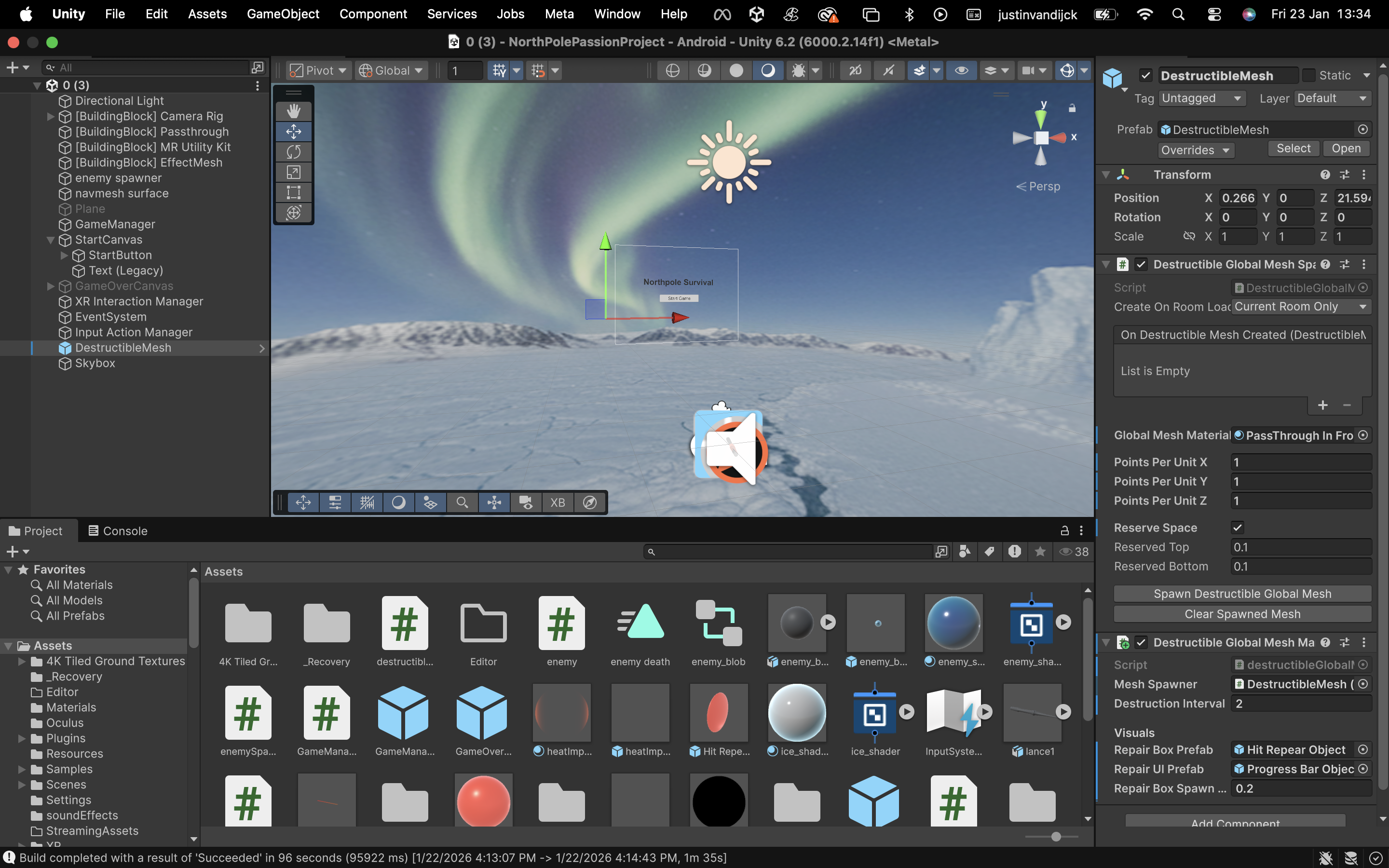
<strong>The North Pole:</strong> Behind the walls, we placed a 360-degree Skybox of a snowy landscape. So when a wall breaks, it looks like your room is actually sitting in the middle of the North Pole.</p>

<hr />

<h2 id="2-the-repair-mechanic">2. The Repair Mechanic</h2>
<p>Once a wall is broken, we needed a way to bring it back.
I initially tried to make it so you could just shoot the broken wall pieces to fix them, but the collision detection was unreliable.</p>

<p><strong>The Solution:</strong> We added a dedicated Repair Hitbox.</p>

<p>When a wall breaks, a specific object (a cube) spawns in the center of the hole.
To repair the wall, you aim your Thermal Lance at this object and hold the trigger for 2 seconds.
This object handles the collision and the progress bar. When the bar fills up, the object destroys itself, and the original wall mesh is turned back on.</p>

<p><strong>Problem:</strong>
Currently only the cube is visible, the progressbar is not, it might be clipped in the cube or behind the wall, i have no clue currently.</p>

<hr />

<h2 id="3-result">3. Result</h2>
<p><strong>This creates a simple loop:</strong></p>

<p>A timer (every 4 seconds) makes a segment on the wall dissapear.
A Repair Object appears in the hole.
Player shoots the object for 2 seconds to fix the wall.
It makes the room feel like part of the game rather than just a background.</p>

<hr />

<h2 id="4-unity">4. Unity</h2>
<p><img src="/assets/skybox-unity.png" alt="screenshot of skybox in unity" /></p>

<hr />

<h2 id="5-resources">5. Resources</h2>

<p>https://www.youtube.com/watch?v=FepNBOXLo9Y</p>]]></content><author><name>Justin Van Dijck</name></author><summary type="html"><![CDATA[Platform: Meta Quest 3 (Unity) Genre: Mixed Reality Survival Shooter Theme: North Pole Containment / Thermal Defense]]></summary></entry><entry><title type="html">Day 13 &amp;amp; 14 — UI, Game Flow &amp;amp; updating the enemy</title><link href="https://snellejustin.github.io/2026/01/20/day-13-&-14-UI,-Game-Flow-&-Updating-the-enemy.html" rel="alternate" type="text/html" title="Day 13 &amp;amp; 14 — UI, Game Flow &amp;amp; updating the enemy" /><published>2026-01-20T00:00:00+00:00</published><updated>2026-01-20T00:00:00+00:00</updated><id>https://snellejustin.github.io/2026/01/20/day-13-&amp;-14-UI,-Game-Flow-&amp;-Updating-the-enemy</id><content type="html" xml:base="https://snellejustin.github.io/2026/01/20/day-13-&amp;-14-UI,-Game-Flow-&amp;-Updating-the-enemy.html"><![CDATA[<p><strong>Platform:</strong> Meta Quest 3 (Unity)<br />
<strong>Genre:</strong> Mixed Reality Survival Shooter<br />
<strong>Theme:</strong> North Pole Containment / Thermal Defense</p>

<hr />

<h2 id="overview">Overview</h2>
<p>A game isn’t a game if you can’t lose.
Up until now, we had the melting of enemies and enemies that spawned, but no real “Game Loop.” 
Sunday and Monday were dedicated to wrapping the core mechanics in a proper structure: Start Screens, Game Over states, and the logic to switch between them.
Another small chenge i made was making the enemy blob vertex points move to make it feel more alive. This went quite quick without too many issues.</p>

<hr />

<h2 id="1-the-goal">1. The Goal</h2>
<p>In Mixed Reality, you can’t just slap a 2D menu on the screen like in a PC game. 
It feels unnatural and breaks the illusion of the enemies being in your room.
We needed:</p>

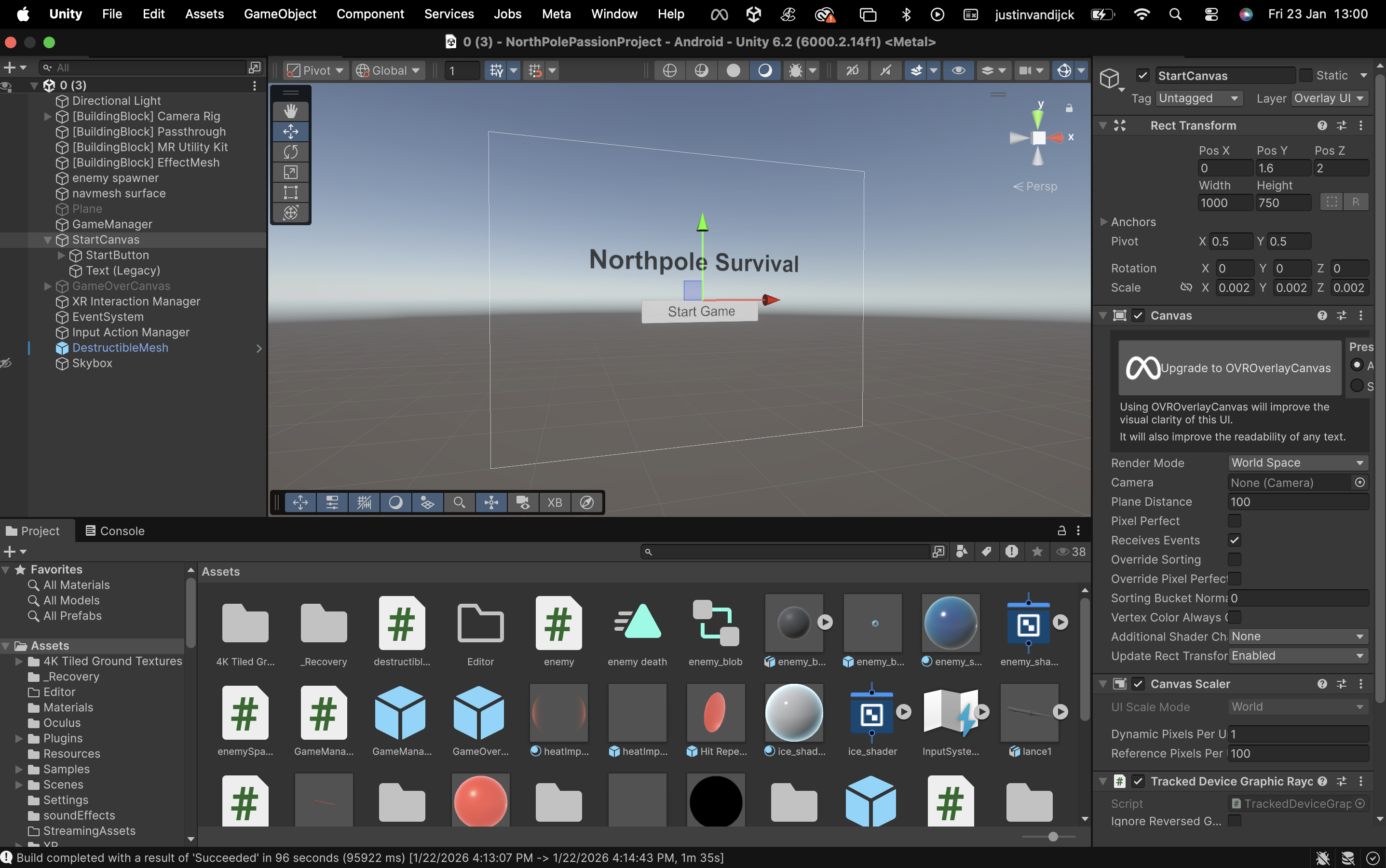
<p><strong>Floating Menus:</strong> UI that exists in 3D space, floating comfortably in front of the player.
<strong>Input Switching:</strong> You need a laser pointer to click buttons, but a Thermal Lance to fight enemies. You can’t have both active at once without it feeling clunky.</p>

<hr />

<h2 id="2-the-tech-world-space-canvases">2. The Tech: World Space Canvases</h2>
<p>Unity’s UI system is powerful, but for VR/MR, we use World Space render mode. This detaches the UI from the “screen” and turns it into a physical object in the world.
We built a central brain to handle the state of the game. It manages the transition between two distinct modes:</p>

<p><strong>Menu Mode:</strong>
<strong>Visuals:</strong> Shows the Start or Game Over floating panels.
<strong>Input:</strong> Activates the XR Ray Interactor (your standard VR/MR laser pointer).
<strong>Gameplay:</strong> Pauses enemy spawning and hides the weapon.</p>

<p><strong>Combat Mode:</strong>
<strong>Visuals:</strong> Hides all menus.
<strong>Input:</strong> Deactivates the Ray Interactor and enables the Thermal Lance.
<strong>Gameplay:</strong> Begins the enemy waves and enables wall destruction.</p>

<hr />

<h2 id="3-the-too-many-enemies-fail-state">3. The “Too Many Enemies” Fail State</h2>
<p>Currently it’s a pressure-based lose condition.
Instead of a health bar, you lose if you let the infestation get out of control.</p>

<p><strong>The Limit:</strong> If 15 enemies are alive at once, the containment is breached.
<strong>The Result:</strong> The game immediately stops, the weapon deactivates, and the “Game Over” UI floats in front of you, offering a Restart and Quit button.</p>

<p><strong>Note:</strong> This will later be optimised, for now this is enough to have the game working.</p>

<hr />

<h2 id="4-result">4. Result</h2>
<p>We now have a full, playable loop.
You put on the headset, see a floating “Start” button, click it, and your controller transforms into a Thermal Lance. You fight to keep the population down, and if you get overwhelmed, the system shuts down and resets. 
The enemies look more alive</p>

<hr />

<h2 id="5-unity">5. Unity</h2>
<p><img src="/assets/ui-canvas.png" alt="screenshot of start ui in unity" /></p>

<hr />

<h2 id="6-resources">6. Resources</h2>

<p>https://www.youtube.com/watch?v=iVfa_azjnNI
https://www.youtube.com/watch?v=2KSLO9JnxHA</p>]]></content><author><name>Justin Van Dijck</name></author><summary type="html"><![CDATA[Platform: Meta Quest 3 (Unity) Genre: Mixed Reality Survival Shooter Theme: North Pole Containment / Thermal Defense]]></summary></entry><entry><title type="html">Day 17 to 20 — The first big issue</title><link href="https://snellejustin.github.io/2026/01/20/day-17-to-20-The-first-big-issue.html" rel="alternate" type="text/html" title="Day 17 to 20 — The first big issue" /><published>2026-01-20T00:00:00+00:00</published><updated>2026-01-20T00:00:00+00:00</updated><id>https://snellejustin.github.io/2026/01/20/day-17-to-20-The-first-big-issue</id><content type="html" xml:base="https://snellejustin.github.io/2026/01/20/day-17-to-20-The-first-big-issue.html"><![CDATA[<p><strong>Platform:</strong> Meta Quest 3 (Unity)<br />
<strong>Genre:</strong> Mixed Reality Survival Shooter<br />
<strong>Theme:</strong> North Pole Containment / Thermal Defense</p>

<hr />

<h2 id="overview">Overview</h2>

<p>I spent a few days stuck on a really annoying issue. I was trying to get the enemies (blobs) to spawn from the walls using the room scan data. The code looked fine, the logic was there, but nothing was showing up in the game.</p>

<hr />

<h2 id="what-i-tried">What I Tried</h2>

<p>I checked pretty much everything I could think of:</p>

<p>I checked if the prefabs were null.
I checked if they were spawning inside the walls or at the wrong coordinates.
I messed with the materials and shaders to make sure they weren’t just transparent.
I checked the camera layers.
I even made them huge just in case they were too small to see.
The strange part was that the i didnt get any warnings or errors, even when focusing on different parts of the game nothing changed.
that’s when i knew it wasn’t a mistake in the code, but something general. which made it harder to solve, no one on the internet could help me and ai also didn’t give a clear explenation, ai was just guessing stuff that i know didn’t have anything to do with my issue</p>

<hr />

<h2 id="the-fix">The Fix</h2>

<p>I decided to go over ALL of my settings to see if there was something strange, 
it turned out to be something really simple. I was just in the wrong scene.
This must have happened when my Unity crashed and opened a recovered scene instead of the one i was actually loading in my meta quest.</p>

<hr />

<p>I was editing the scripts and prefabs in the SampleScene, but whenever I hit Play in Unity, it was loading a recoveredScene I had open. So the code was technically running, but it was spawning objects in a completely different scene than the one I was looking at.</p>

<hr />

<h2 id="lesson-learned">Lesson Learned</h2>
<p>Always check which scene is actually active. I assumed I was testing my changes, but I was looking at an empty scene the whole time.</p>

<hr />]]></content><author><name>Justin Van Dijck</name></author><summary type="html"><![CDATA[Platform: Meta Quest 3 (Unity) Genre: Mixed Reality Survival Shooter Theme: North Pole Containment / Thermal Defense]]></summary></entry><entry><title type="html">Day 12 — Working with Unity shader</title><link href="https://snellejustin.github.io/2026/01/16/day-12-Working-with-Unity-shader.md.html" rel="alternate" type="text/html" title="Day 12 — Working with Unity shader" /><published>2026-01-16T00:00:00+00:00</published><updated>2026-01-16T00:00:00+00:00</updated><id>https://snellejustin.github.io/2026/01/16/day-12-Working-with-Unity-shader.md</id><content type="html" xml:base="https://snellejustin.github.io/2026/01/16/day-12-Working-with-Unity-shader.md.html"><![CDATA[<p><strong>Platform:</strong> Meta Quest 3 (Unity)<br />
<strong>Genre:</strong> Mixed Reality Survival Shooter<br />
<strong>Theme:</strong> North Pole Containment / Thermal Defense</p>

<hr />

<h2 id="overview">Overview</h2>
<p>For the past few days, our enemies have been simple blue balls.
They moved and they died, but they didn’t look like the “frozen icy sludge” creatures I imagined. Yesterday, we finally tackled the visuals, using Unity Shader Graph to bring the ice blobs to life.</p>

<hr />

<h2 id="1-the-goal">1. The Goal</h2>
<p>The concept for the enemies is that they should look like an icy virus.
They shouldn’t look like solid blocks of ice (too clean) or just water (too fluid).
Right now it tends to look more like a solid ice ball though, this is because i’m new to creating my own shaders, so hopefully by the end of the project i will be able to make the inside of the ice ball more ‘liquid looking’.</p>

<hr />

<h2 id="2-the-tech-unity-shader-graph">2. The Tech: Unity Shader Graph</h2>
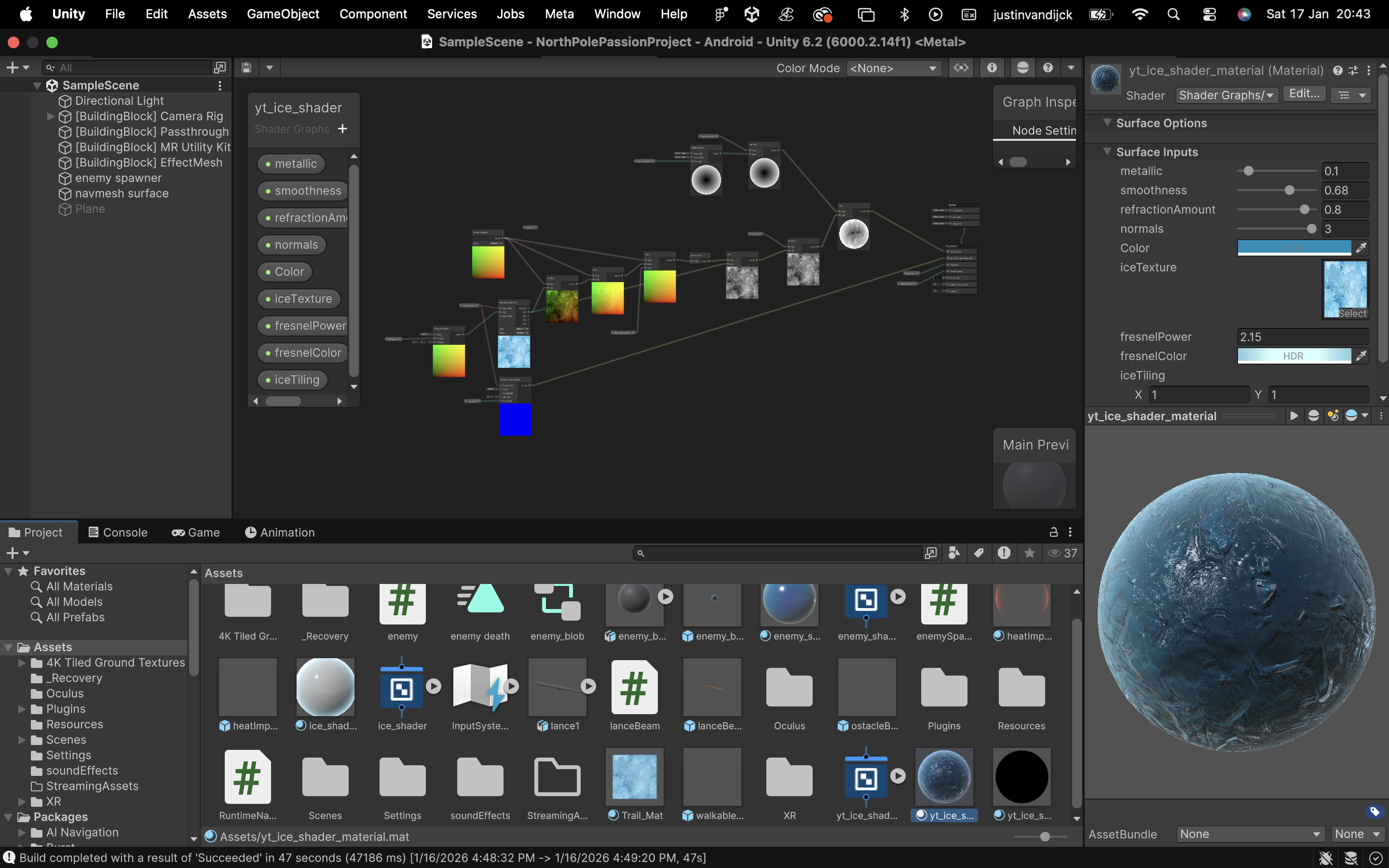
<p>To achieve this look without expensive textures, I built a custom shader (and used a free ice texture from the unity asset store to give it an extra touch). 
Here are the key components:</p>

<hr />

<p><strong>Fresnel Effect</strong>
This is used for anything “icy” or “ghostly”.
The Fresnel node highlights the edges of the object where the surface normal is perpendicular to the camera. This gives the blobs a glowing, frozen rim light that separates them from the real-world background.</p>

<p><strong>Transparency &amp; Refraction</strong>
The material is set to Transparent.
This allows you to see slightly “into” the blob, giving it volume. We also added a slight distortion (refraction) to the background behind it, making it feel like a dense, refractive material.</p>

<hr />

<h2 id="3-result">3. Result</h2>
<p>The blue balls are gone. It now looks more like an icy ball. 
There are still some improvements to be made, but for now it’ll do.</p>

<hr />

<h2 id="4-unity">4. Unity</h2>
<p><img src="/assets/shader_ice.png" alt="screenshot of the ice shader in unity" /></p>

<hr />

<h2 id="5-references">5. References</h2>
<p>https://www.youtube.com/watch?v=Gym5JWHgjkk&amp;t=3s
I watched this video about how to use the nodes to create a icy shader</p>]]></content><author><name>Justin Van Dijck</name></author><summary type="html"><![CDATA[Platform: Meta Quest 3 (Unity) Genre: Mixed Reality Survival Shooter Theme: North Pole Containment / Thermal Defense]]></summary></entry></feed>